Intro
Secure and scalable cross-account communication is always challenging and usually critical for business operations in scenarios in which data governance is a significant concern.
Amazon EventBridge is a serverless event-bus service ideal to implement event-driven architectures. It streams real-time data from a variety of sources such as:
- Events from own applications
- SaaS applications from several AWS’ partners,
- AWS services
Then it is possible to route those messages to targets such as
- AWS services (like AWS Lambda or Kinesis)
- API destinations, making HTTP requests to custom endpoints
- or to an EventBridge bus in another account
As we can see, Amazon EventBridge is an excellent managed service that makes it easy to deliver messages to other AWS accounts in a simple, scalable, reliable, and cost-effective way.
Let’s dive deeper into it.
Problem to Solve
We recently had a scenario in which a particular datastore would only be available in a specific AWS account for an organization due to governance business constraints. Therefore, we were only allowed to permission an IAM Service Role and only serverless resources that needed to remain private to that AWS account owning the datastore (let’s call it the Receiver Account from now on).
We needed to develop an architecture that would allow querying the data in the Receiver Account. Still, due to the business constraints in place, it was not possible to create a public interface between the internet and the receiver account. However,
we were allowed to give permissions to an IAM service role and serverless resources private to the receiver account.
The latency between issuing a query and getting the result was not a primary concern as long as it didn’t was longer than a few seconds. Also, we didn’t expect a high load on the system that performed the query.
We thought we could authorize another AWS Account (lest’s call it the Emitter Account) to communicate through a private channel with the Receiver Account through an IAM Service Role.
Roadmap
Reading the AWS Documentation for creating a cross-account or cross-region EventBridge target, we see that several steps are necessary to set everything up:
- Create custom event buses in both the sender and receiver accounts.
- On the Receiver Account, edit the permissions on the event bus to allow specific accounts to send events.
- On the Emitter Account, specify one or more rules with the receiver account’s event bus as the target.
- On the Receiver Account, set up one or more rules that match events from the sender account.
Before we jump into that some EventBridge concepts that will be useful as we move on to the details:
- Events: An event represents a change of state in a particular environment. Events have the following attributes:
- Version: A string that declares the versioning of the event to make event processing backward compatible if necessary, which by default is 0.
- ID: A string for a unique identifier of the event.
- Detail Type: A human-readable short description of the event
- Source: A service-namespaced string to identify the system sending the event. Custom events can have anything like the source, as long as it doesn’t start with aws.
- Account: The 12 digits of the account number that generated the event.
- Time: The timestamp for the event creation in ISO 8601 time string format.
- Region: The AWS Region in which the event was created.
- Resources: A JSON array with the ARNs of the resources involved in the event.
- Detail: A schema-less JSON object left to the discretion of the event submitter.
- Rules: A rule is a construct that matches incoming events and routes them to targets for further processing. Its structure resembles the event structure (it partially matches it). You can be interested in events sent by a particular source(s), by specific account, from given regions, with certain detail, if it involved specific resources or a combination of them. A rule can be as narrow and specific or as broad as desired.
- Targets: Targets take care of the processing of an event routed to it. The events are received in JSON format. Targets can be: EC2 instances, Lambda functions and Step Functions state machines, Kinesis streams, ECS tasks, SNS topics, SQS queues.
- Event Buses: Event buses receive events. Rules are associated with a specific event bus. Accounts have a default event bus, which receives events from AWS services. It is possible to create custom event buses to receive events from your applications. It is also possible to create partner event buses to receive events from SaaS partner applications.
- Partner event sources: AWS partners use them to send events to an AWS customer account. To receive these events, you must associate an event bus with the partner event source. Although working with EventBridge Partner Services is beyond the scope of this article, we’d like to mention just a few Partner Services that we found appealing working with Salesforce, Auth0, Datadog, MongoDB Atlas, New Relic, PagerDuty, Shopify, Zendesk, among many others.
Some notes about EventBridge Limits:
- An AWS account can have up to 100 Event Buses.
- Each Service Bus supports up to 300 Rules.
- Each Rule can have up to 5 Targets.
- An Event Pattern can have up to 2048 characters.
- An Event can have up to 256 KB.
- The latency between an event is created and received is about half a second.
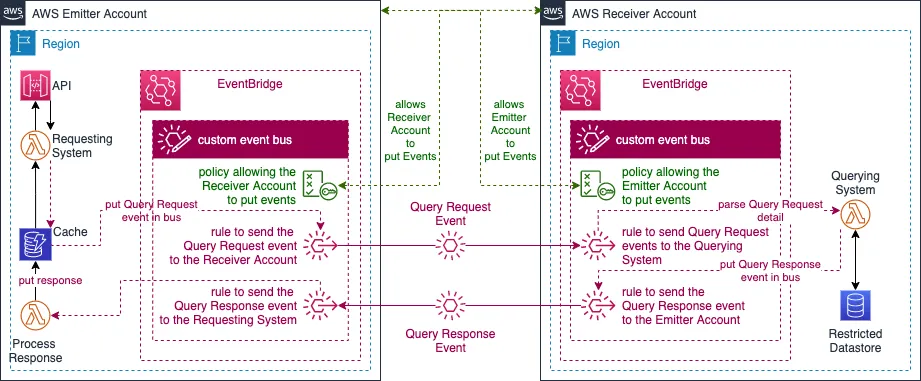
We came up with this necessary Infrastructure (all serverless) to satisfy the cross-account query/response scenario provided with this powerful and flexible service.
Is almost like “the Q part” in the CQRS architecture pattern.
Journey
The “root” issue
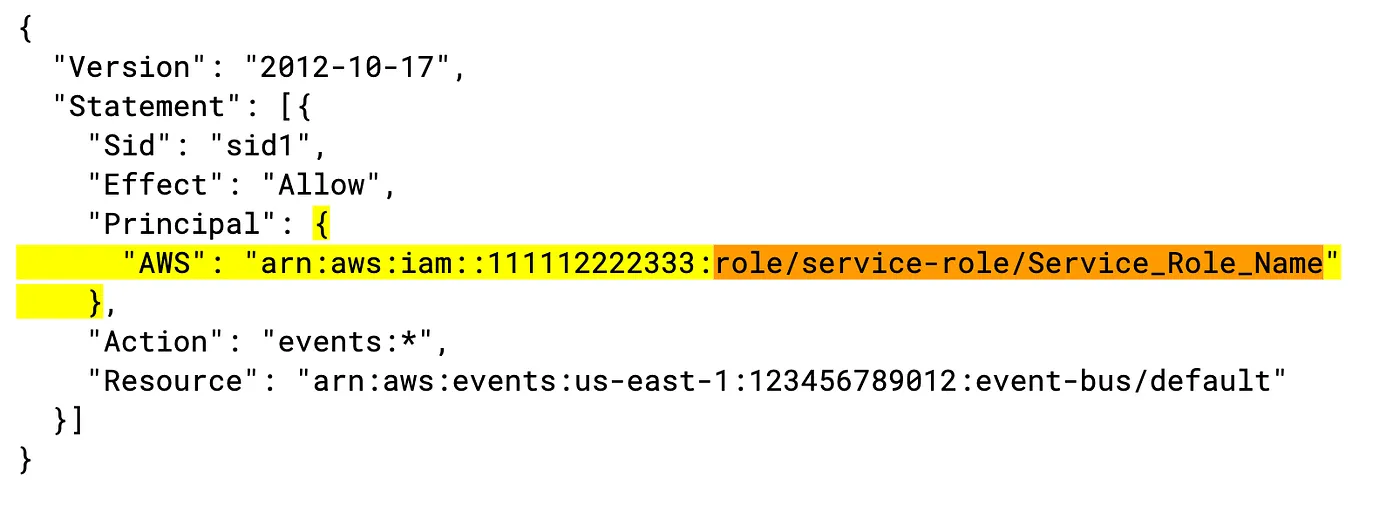
The first issue we figured out was a small odd detail in AWS’s documentation for creating event bus policies to send events to the buses on different accounts. The document specifies a policy in which permissions Principal is the ARN of the AWS Account’s IAM root user:
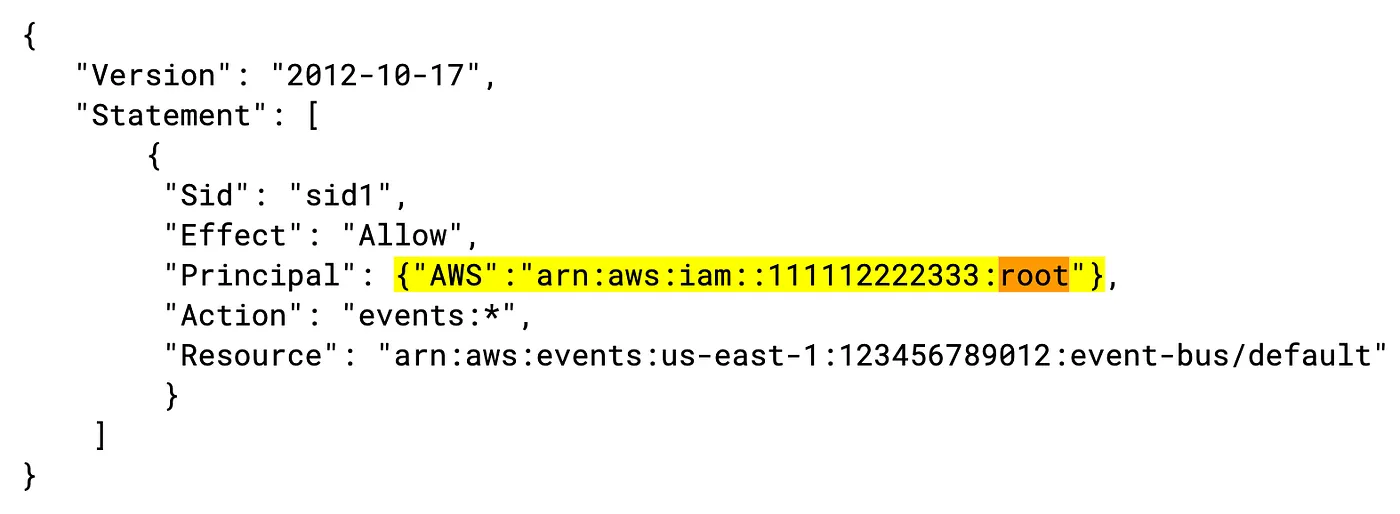
Although this is not incorrect per-se, using the root account for standard operations is strongly discouraged. If you use that policy outlined in the document, it won’t work since the message sender will never be the account’s root user.
We went ahead and just used just the AWS account id at the beginning of our trials, just permission the sender account itself. So the fixed policy looked like this:
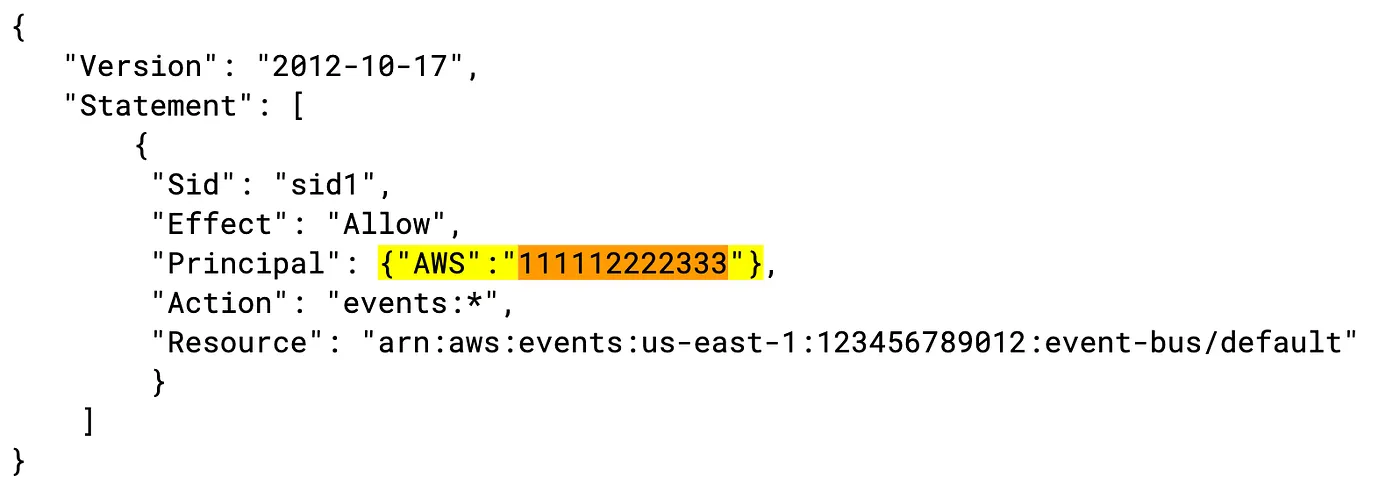
Later on, we updated the event bus policy to an IAM of a service role, which worked fine.
Our final policy looked something like this:
Logging it out
Another thing that seemed strange when we started using EventBridge is the lack of an events historical log in the console. We didn’t find a way to set a Rule with a CloudWatch Log group as Target, either. Our understanding is that this is going to be implemented by AWS soon.
There isn’t a default way to see past events by default. So, we found it helpful to create a rule to send all the events we were interested in into a Lambda Function to print the event out to the respective Cloudwatch log group.
I hope that someone gets my message in a bottle, yeah
Ok, time to put this into practice. After a couple of proofs of concepts, we came up with a design that allowed us to perform these queries in the Receiver Account’s private data store. This is a simplified version of the sequence:
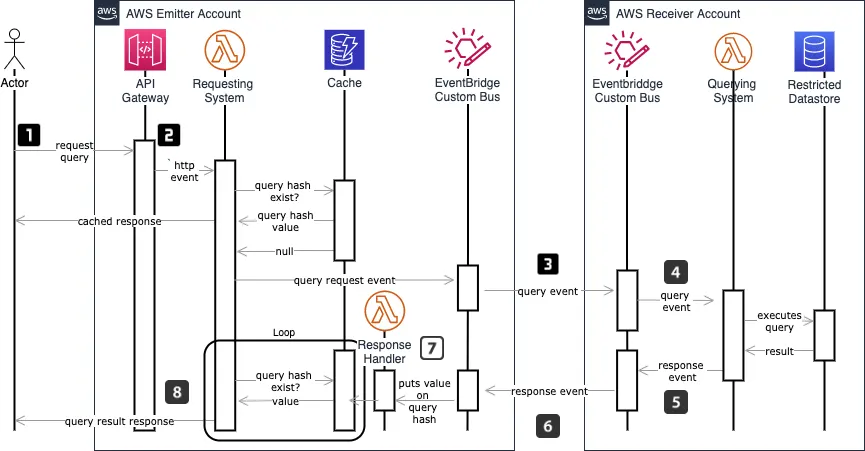
- An actor submits an HTTP(s) request to a private API in the Emitter Account. The Authorization of this request is intentionally omitted in this diagram for brevity.
- The request (at this point assumed authorized) will trigger a Lambda function in the Requesting System. The Lambda creates a hash of the query in the request to check against a cache for that particular user to find out if this is a request that has been executed before so that results can be taken directly from the cache rather than processed through the whole request pipeline.
- If there is no cached response, a query request event message is created and put in a custom event bus where it is matched against the EventBus rules’ patterns and sent to the Receiver Account’s custom event bus. This lambda will continuously query the Cache for a value for the query hash on a loop/sleep cycle until it finds a match or it times out. In this way, this Lambda “will wait” until the query is executed in the Receiver Account, and the result is sent back to the Emitter Account.
- A rule set in the Receiver Account custom event bus will be evaluated against the incoming message. Then EventBridge will forward to a Querying System’s Lambda to execute the requested query.
- The Lambda will retrieve information from the private data store, creating an outbound query response event message, which will have the query result in the detail attribute of the event.
- Another rule in the Receiving Account event bus will forward this message back to the Emitter Account/s custom event bus.
- Once received back in the Emitter Account event bus, this query response event message will trigger a Lambda based on a matching rule. This triggered Lambda target will use the detail attribute of the message to process the response and store it in the Cache.
- Once a value is stored in the Cache for that particular query hash, the Lambda in point 2 will exit the loop/sleep cycle returning the response to the user. The next time the same query is requested, a value will exist in the cache, returning the result immediately. Note that, for brevity, we’re not showing any of the cache-invalidation mechanisms. When the private data store in the Receiving Account is updated, a cache invalidation message is sent to the Emitter Acccount’s custom event bus, which, based on another rule, triggers an invalidation of the cached values.
We think and we do
We always like to prove with working code our ideas, so we have published a simplified version of this project on Github for educational purposes, implemented with the Serverless Framework. Keep in mind that many details in this repository have been abstracted away for the sake of simplicity.
Check the demo project in Github: https://github.com/whiteprompt/r-d-11218-cross-account-eventbridge
Takeaways
When working in AWS and faced with scenarios in which Cross Account communication is needed, EventBridge is a managed service that can simplify the solutions significantly. In addition, it is a cost-effective, reliable, and reasonably performant service that makes implementing event-driven architectures a pleasure.
Configuring EventBridge to make Cross Account communication possible required a good understanding of IAM policies. How these policies are shown in the examples in the official EventBridge documentation seemed off to us. You need to make sure that the policies make sense in your context.
EventBridge still lacks a default way to log out all the events put in the event buses. Creating a rule with a target that puts the events in CloudWatch made our work much easier.
Time for you to send us a message! (no pun intended)
Event-Driven architectures simplify the communication of the systems, keeping them decoupled. “If every bee does its job, the result is a healthy hive. This is our approach to Event-Driven architectures. A set of independent beings, all interconnected in a fast and reliable way, doing their job for the greater good.”
Do you want to benefit from Event-Driven Architectures?
Please send us a message! We can help!