The Axios incident: Quick Survival Guide
What you need to know
On March 31st 2026, a compromised Axios package briefly propagated through the npm ecosystem, attackers published a few versions with a post-install script that installed a RAT (Remote Access Trojan).
If you or any of your servers ran npm install between 00:21 UTC and 03:29 UTC, there is a non-zero chance that arbitrary code executed either in your laptop, CI pipelines, or a remote environment.
How it affects your company
A trojan with access to a dev’s laptop can read propietary code, confidential emails, and internal company data.
A trojan with access, even briefly, to a CI/CD pipeline can read all the environment variables used by the build. It also has access to the same network where CI runs (If you’ve automated DB migrations you can probably see where this is going).
A trojan with access to a remote environment can read every runtime environment variable in your remote environment. Yeah, even production. And yes, this includes your Postgres connection string and Stripe API key.
But hey, at least you’re using IAM roles instead of putting an AWS_ACCESS_KEY in your environment variables, right?
…right?

Breathe slowly, here’s how you fix this
- Make sure every developer in your company checks their machine for these three files
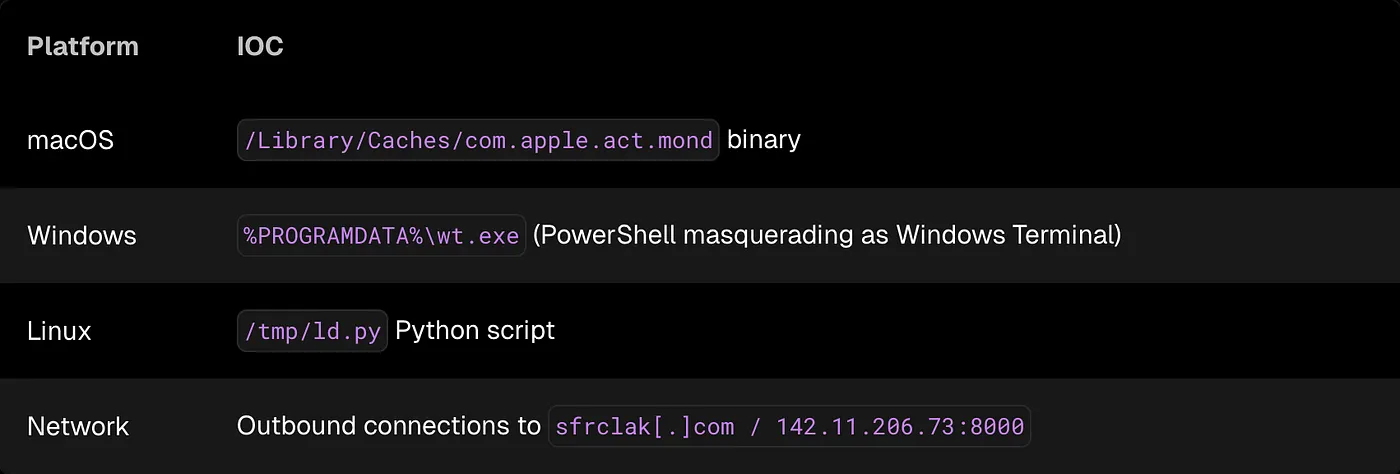
-
Make sure your CI didn’t run
npm installwithout a frozen lockfile between 00:21 UTC and 03:29 UTC. If it did, rotate every secret available to the CI runtime. -
If your containers run
npm installornpm updateduring boot without a frozen lockfile, rotate every secret in every environment.
Container pods can and will restart when you least expect them, so you should assume they did.
And if you’re running npm install when containers boot… this incident is a great opportunity to reconsider that design decision.
Alright, you’re safe. How to prevent this next time?
Personally, I don’t like things running on my infrastructure without my explicit consent.
This supply chain attack relied on postinstall scripts executing during dependency installation. Modern package managers like pnpm and Bun block these scripts by default, and they significantly reduce the attack surface.
If a dependency needs to execute arbitrary code during installation, that’s something you should review manually.
There are some simple practices that also help prevent incidents like this:
- Always install dependencies from a frozen lockfile (
npm ci,pnpm install --frozen-lockfile, etc). - Avoid running
npm installin production environments or when containers boot. - Consider disabling install scripts entirely (
--ignore-scriptsin CI environments. - Use reproducible builds so that the exact dependency tree is always known ahead of time.
- Switch to a more modern Node package manager like pnpm or Bun.
Final thoughts
The npm ecosystem assumes that installing dependencies may execute arbitrary code. That’s convenient for developers, but it’s also a fantastic attack surface.
Supply chain attacks will keep happening, running npm install in production environments shouldn’t.