For years, every project at White Prompt has started the same way: with a Design & Discovery phase before a single line of production code. It’s how we estimate a project before we execute it, how we sell it on those estimates, and how we then run it against the plan we sold.
The phase has three parts:
- Discovery. Kickoff, project context, brainstorming, and competitor analysis with the client. We capture epics, the functional scope feature by feature, personas, open questions, risks, assumptions, and a shared dictionary of domain terms.
- Design, twice. On the product side, user flows, wireframes, mockups, branding, and a style guide, which become clickable prototypes the client can react to. On the technical side, the object model, architecture, and DevOps design, so the estimate depends on how the system will actually be built.
- Estimation. Every feature gets backend and frontend hours, every piece of infrastructure and project setup gets its own line, and the whole thing turns into a resource plan, a cost, and a timeline.
It all lived in one Google Sheet per project. One tab for epics, one for scope, one for risks, and so on. Consultants and clients thought together in the sheet, and it worked. We sold the estimate that came out of it, and we executed the plan that came with it.
Why we built a tool
It started with AI in the room. Our discovery sessions are long, usually two to three hours, and a project can need three, four, or as many as it takes. We began using AI to capture requirements during those sessions: epics, features, questions, and risks as the client talked through them. The capture got fast. Loading it all into the spreadsheet afterward did not, and it quickly became the most tedious part of the job.
So we started integrating agents directly with the spreadsheet. Claude Projects was the intermediate step: a place to store each engagement’s context, our templates, and our estimation process, while we figured out how to agentize the process itself. It worked, but it also showed us the ceiling. Agents could fill cells in a sheet; they couldn’t give us versioned plans, schedules, proposals, or a SOW, and they couldn’t tie our D&D process to how the business actually sells and runs projects.
We realized we needed a tool: one place to add functionality the sheet couldn’t hold and to tie our Design & Discovery process to our business end to end. That became the Design & Discovery Manager, an internal app that reads the discovery record and carries it through to a client-facing proposal and a SOW they can sign.
At first, it was a side project: a few evenings of wiring our agents and the sheet to a small app. Once it produced its first plan and proposal straight from a real discovery, the conversation changed. It stopped being a personal experiment and quickly became a company initiative in our OKRs, with a clear goal: run, estimate, propose, and contract every D&D from one place.
Keeping the spreadsheet while moving to a database
We couldn’t stop selling projects while we built the tool that sells them. So the first rule was: the spreadsheet keeps working, always. The app reads the same sheet our consultants already used, tab by tab, and writes back to it. We store every relationship twice: a readable name for humans and a stable ID for the app, so people can keep editing the sheet by hand and nothing breaks.
That gave us backward compatibility for every project already in flight, and it meant we could keep estimating with the sheet on days when a feature in the app wasn’t finished yet. The tool earned its place screen by screen instead of demanding a big-bang migration.
As the tool grew, we moved what a spreadsheet does badly into Postgres: numbered plan versions, schedules, published proposals, client access and visit tracking. Even there we kept the bridge: when a plan is saved, it goes to the database and to backup tabs in the same sheet. The sheet is still where discovery happens; the database is where things that need history and access control live.
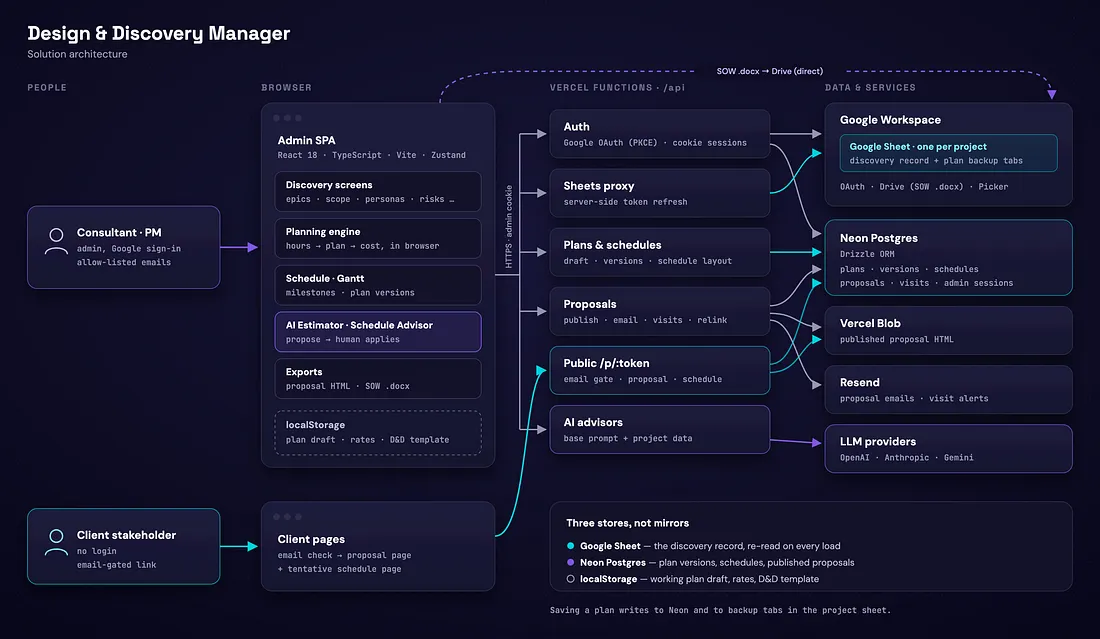
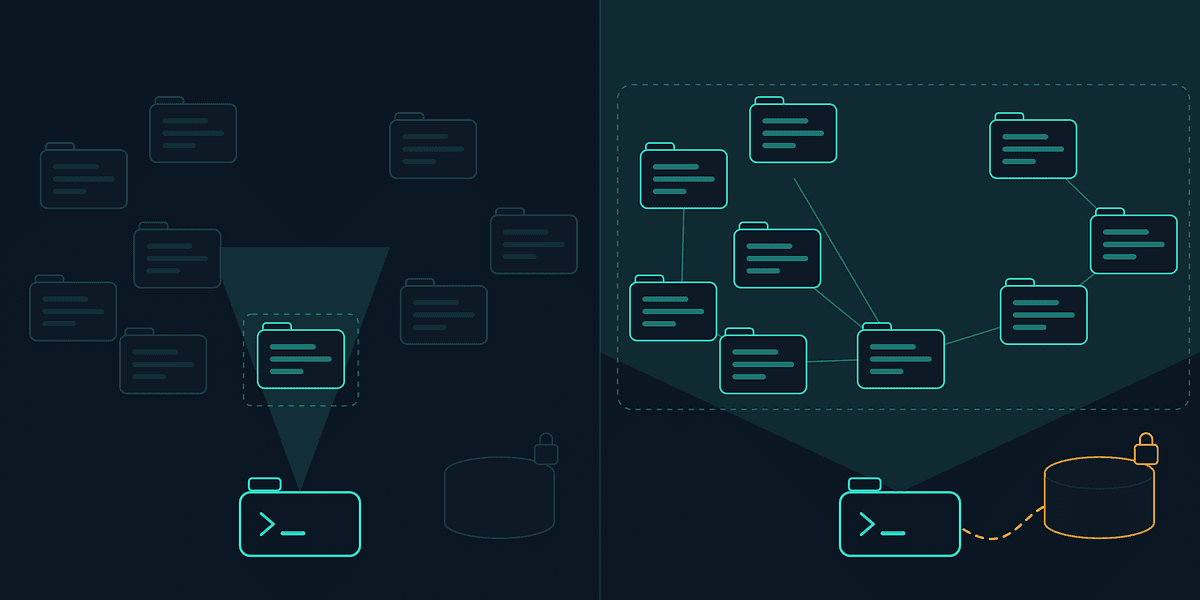
Here’s how the pieces fit: the browser app does the planning math, Vercel functions handle anything that needs a secret, and each kind of data lives in the store that suits it.
Spec-driven and documented to scale
The whole system is built with spec-driven design. Every feature starts as a written spec: what it does, why, and what it deliberately leaves out. The spec becomes a plan of small, checkable tasks an agent can execute one by one on its own branch and submit as a pull request. The agent types, we decide and review.
Then we made the repo document itself for whoever comes next, human or agent. The docs are split into three layers, each with one job:
- Product: what each module does and for whom.
- Rules: the exact definition of every number and behavior, from how hours become a plan to who can open a proposal.
- Engineering: architecture, data model, API routes and one reference page per code folder.
On top of that sits a decisions register: every spec with its status (shipped, partial or superseded) and what became of it, plus a known-issues list where every verified bug has a file, a line and an impact. Docs are part of the definition of done, and scripted checks flag code that changed without its doc.
This matters more for agents than for us. An agent starting a task reads one entry file, follows the map to the rule it’s about to change, and learns the traps before it hits them. Good docs are the context window.
Where it stands: from discovery to SOW in one place
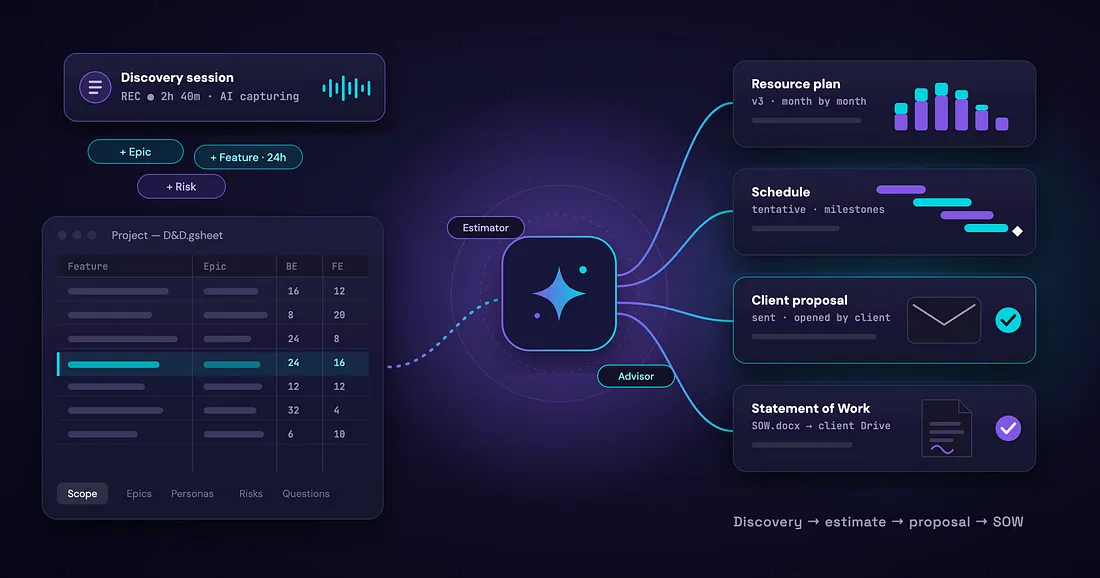
Today we run a project’s whole D&D estimate inside the tool, with agents built into the screens where the decisions happen:
- Scope and estimate. The AI Estimator on Functional Scope, DevOps Scope, and Project Setup reviews items against live project data, flags overly optimistic hours, and proposes concrete edits. It helps us settle the technical side fast: infrastructure per environment, setup tasks, the split between backend and frontend.
- Allocate and price. Hours become a month-by-month resource plan per role and a cost by role and by month. Plans are snapshotted into numbered versions, so we can compare scenarios with a client.
- Schedule. A day-level tentative Gantt with milestones. The Schedule Advisor asks sequencing questions and proposes a schedule or edits to it.
- Propose. One click publishes a proposal page, emails it to the client’s stakeholders behind an email check, and tells us when it’s opened.
- Sign. The Statement of Work is generated from our template and dropped into the client’s Google Drive folder.
One rule holds throughout: the AI only proposes. Every suggestion shows up as a card with the old and new values, and a consultant applies it, one change at a time or all at once. The agents make us faster; the people still own the numbers we sell.
What’s next
The known-issues register is now our backlog, and we’re working through it one row at a time. Next up are richer proposal notifications and closing the gaps between the plan the tool generates and the schedule clients see.
The bigger lesson travels beyond this tool. AI agents build fast; specs, reviews, and living documentation make them last. If you’re thinking about bringing that kind of workflow to your own product, let’s talk.