At White Prompt, we are committed to creating web experiences that are accessible to everyone. Accessibility in web design is not just a nice-to-have feature; it’s a crucial aspect of modern web development. It ensures that our digital products can be used by as many people as possible, regardless of their abilities or circumstances.
Understanding accessibility in web design is essential. It involves designing and developing websites and applications that can be used by people with a variety of disabilities, including permanent, temporary, or situational impairments. This approach not only helps those with disabilities but also improves the overall user experience for everyone, making our products richer and more usable.
Understanding Accessibility
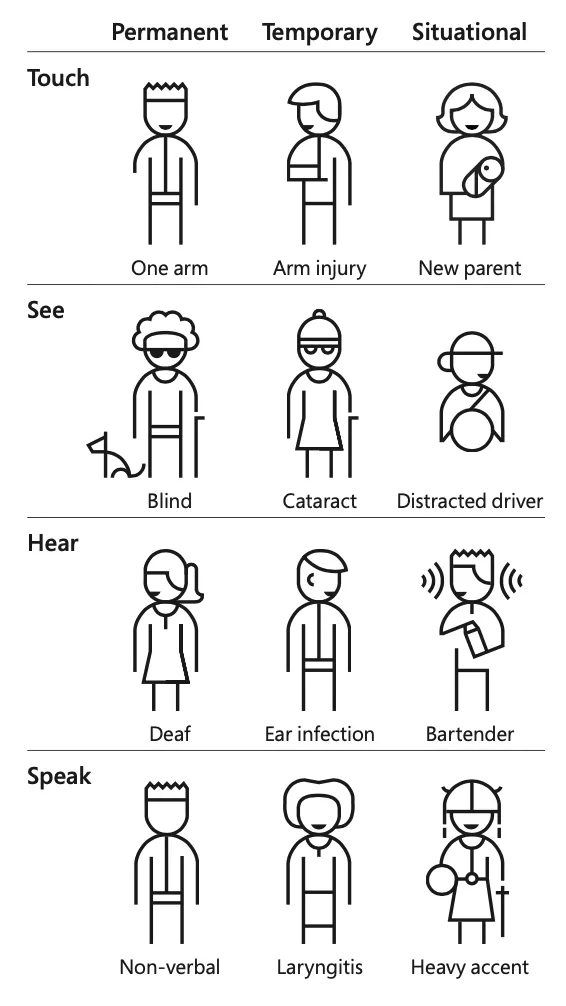
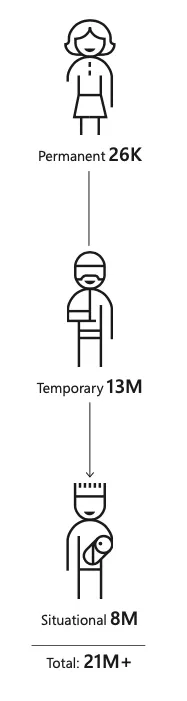
Accessibility in web design means that users, regardless of their abilities, can effectively use a product or service. Disabilities can be permanent, like blindness, temporary, like a broken arm, or situational, like trying to use a phone in bright sunlight. When we consider these diverse needs, we can reach a larger number of users.
Accessibility benefits everyone. For instance, people from different cultural backgrounds, varying levels of technical proficiency, or different age groups all benefit from accessible designs. This inclusivity makes our products better for all users.
The Four Principles of Accessibility (POUR)
To guide us in creating accessible designs, we follow the POUR principles: Perceivable, Operable, Understandable, and Robust.
Perceivable
Content must be presented in ways that users can perceive, regardless of their disabilities. This can include providing alternative text for images, transcripts for videos, and other similar features that make content accessible.
Operable
Users must be able to interact with all interface components. For example, ensuring that a website is navigable using a keyboard helps users with mobility impairments. Additionally, considering users who may have issues like seizures is critical.
Understandable
The information and operation of the user interface must be understandable. This means using clear language, organizing content logically, and providing helpful error messages.
Robust
Content must be robust enough to be interpreted by a variety of user agents, including assistive technologies. This involves using proper HTML and CSS to ensure that content can be accessed by current and future technologies.
Practical Tips for Accessible Web Design
1. Consider Cognitive Diversity
Designing for cognitive diversity means using clear headings and avoiding overwhelming visuals. This helps users with cognitive impairments, such as dyslexia, navigate your site more easily.
2. Implement Skip Navigation Links
Skip navigation links are invaluable for screen reader users. These links allow users to bypass repetitive navigation menus and go directly to the main content.
3. Focus on Pronunciation and Text-to-Speech
For text-to-speech users, consider using phonetic spelling for complex terms. For instance, writing terms in uppercase letters can help screen readers spell out words letter by letter, improving comprehension.
4. Dyslexia-Friendly Fonts
Using fonts that are friendly for dyslexic users can significantly enhance readability. Fonts like Open Dyslexic, Arial, and Verdana can help prevent letter rotation and improve the reading experience.
5. Support Multiple Languages
Designing for a global audience involves supporting multiple languages. This includes adjusting layouts to fit different reading orders, and ensuring that translations are accurate and culturally appropriate.
6. Optimize for Low Internet Connections
Optimizing your site for low internet connections ensures that users in areas with poor connectivity can still access your content. This includes using optimized images and efficient loading strategies. Eg.: if you can change PNG/JPG files for SVG or even font icons, do it!
7. Keyboard-Friendly Drop-Downs
Ensuring that drop-down menus are accessible via keyboard navigation is crucial. Properly implementing focus states allows users who rely on keyboards to navigate menus effectively.
8. Accessible Icons
Icons should be accompanied by hidden labels to describe their function for screen readers. However, if an icon is purely decorative, it’s better to hide the alternative text to avoid redundancy.
9. Focus Order and Tab Index
Optimized tab order ensures that users can navigate your site logically and intuitively. This is essential for keyboard navigation and for users with disabilities. Not always the standard tab order is the best for keyboard navigation
10. SVG Accessibility
SVG images also need to be accessible. Ensure that screen readers can interpret SVGs by using appropriate patterns and techniques.
Emerging Accessibility Challenges
As web technologies evolve, new accessibility challenges emerge. Single-page applications, for example, can be difficult for screen readers to navigate if not built properly. Similarly, responsive design testing must include real-world scenarios, like using a phone with large fingers. Voice UIs need to accommodate users with speech impairments, and AR/VR applications should consider users who rely on other senses.
Conclusion
Accessibility in web design is not just about meeting standards; it’s about creating products that everyone can use. By following the principles of accessibility and implementing practical tips, we can ensure that our web designs are inclusive and usable for all.
Call to Action
We invite you to share your accessibility tips and experiences. If you’re looking to implement these accessibility practices in your projects, contact White Prompt to see how we can help you make your web designs more inclusive. Let’s work together to make the web a more accessible place for everyone.
Also, if you want to learn more about this topic, watch our Online Tech Talk about Accessibility on Web Design